- Jan 27 Thu 2011 16:59
-
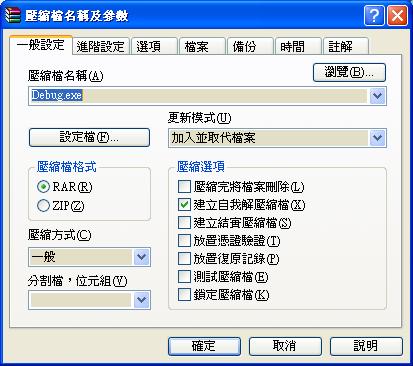
技巧 用RAR自解壓縮
- Jan 26 Wed 2011 15:53
-
笑話 田老師的笑話
- Jan 25 Tue 2011 12:14
-
C# 開檔 利用 OpenFileDialog 元件,制作目錄 record
利用 OpenFileDialog 元件
OpenFileDialog of開檔=new OpenFileDialog();
if (of開檔.ShowDialog() == DialogResult.OK)
{
this.t檔案路徑.Text = of開檔.FileName;
}
OpenFileDialog of開檔=new OpenFileDialog();
if (of開檔.ShowDialog() == DialogResult.OK)
{
this.t檔案路徑.Text = of開檔.FileName;
}
- Jan 25 Tue 2011 12:09
-
C# string.Split 用法 record
- Jan 22 Sat 2011 15:51
-
XNA 3D材質 注意事項 record
- Jan 22 Sat 2011 08:21
-
創業 創業最常犯的錯誤
- Jan 21 Fri 2011 15:13
-
FTP 不能下載自訂副檔名的解決方法
FTP 不能下載自訂副檔名的解決方法
修改web.config的檔案
<?xml version="1.0" encoding="utf-8"?>
<!--
注意: 除了手動編輯這個檔案以外,您也可以使用
Web 管理工具設定您的應用程式設定值。請使用
Visual Studio 中的 [網站] -> [ASP.NET 組態] 選項。
如需完整的設定與註解清單,請參考
machine.config.comments (通常位於
\Windows\Microsoft.Net\Framework\v2.x\Config)
-->
<configuration>
<system.webServer>
<staticContent>
<mimeMap fileExtension=".dss" mimeType="dss/custom" />
<mimeMap fileExtension=".uiw" mimeType="uiw/custom" />
</staticContent>
</system.webServer>
</configuration>
修改完畢把這個檔案放在要下載檔案的同目錄即可
- Jan 18 Tue 2011 15:19
-
XNA 讓3D模型變透明 record
方法一:
在渲染模型的時候,設置一下這個參數就可以了:
BasicEffect.Alpha = XXX;
這裡的Alpha是透明度,取值在0-1之間,0是完全透明,1是完全不透明,
foreach (ModelMesh mesh in _model.Meshes)
{
foreach (BasicEffect effect in mesh.Effects)
{
if (this.EnableColor)
{
effect.DiffuseColor = this.Color.ToVector3();
effect.Alpha = (float)(this.Color.A) / 255f;
}
effect.World = this.InnerTransform * this.Transform;
effect.View = view;
effect.Projection = projection;
if (this.EnableLighting)
{
effect.EnableDefaultLighting();
}
}
mesh.Draw();
}
在渲染模型的時候,設置一下這個參數就可以了:
BasicEffect.Alpha = XXX;
這裡的Alpha是透明度,取值在0-1之間,0是完全透明,1是完全不透明,
foreach (ModelMesh mesh in _model.Meshes)
{
foreach (BasicEffect effect in mesh.Effects)
{
if (this.EnableColor)
{
effect.DiffuseColor = this.Color.ToVector3();
effect.Alpha = (float)(this.Color.A) / 255f;
}
effect.World = this.InnerTransform * this.Transform;
effect.View = view;
effect.Projection = projection;
if (this.EnableLighting)
{
effect.EnableDefaultLighting();
}
}
mesh.Draw();
}
- Jan 14 Fri 2011 17:21
-
XNA MathHelper.Clamp 的意思 record
blockPosition.X = MathHelper.Clamp(blockPosition.X,0, Window.ClientBounds.Width - blockTexture.Width);
//這裡的意思是,把方塊的X軸坐標限制在遊戲屏幕之內
//這裡的意思是,把方塊的X軸坐標限制在遊戲屏幕之內
- Jan 13 Thu 2011 11:44
-
SQL 利用BEGIN DISTRIBUTED TRANSACTION (Transact-SQL) 來同步不同伺服器的資料庫
SQL 利用BEGIN DISTRIBUTED TRANSACTION (Transact-SQL) 來同步不同伺服器的資料庫
BEGIN DISTRIBUTED TRANSACTION (Transact-SQL)
BEGIN DISTRIBUTED TRANSACTION (Transact-SQL)
- Jan 06 Thu 2011 12:06
-
C# FTP協定上傳檔案 record
利用WebClient上傳檔案(底子裡好像是FTP協定)
1.FTP資訊欄位驗證 (FTP位置、FTP帳號、FTP密碼)
private Boolean doFieldsvalidation_FTP_Info()
{
Boolean rtnRetResult = false;
if (!RegExService.IPV4_FORMAT(this.tbox_FTP_Address.Text))
{
frmUtil.showMessageBox_No_Returns("非有效的IP格式");
return rtnRetResult;
}
if (tbox_FTP_ID.Text.Trim() == string.Empty)
{
frmUtil.showMessageBox_No_Returns("請輸入FTP帳號");
return rtnRetResult;
}
if (tbox_FTP_PW.Text.Trim() == string.Empty)
{
frmUtil.showMessageBox_No_Returns("請輸入FTP密碼");
return rtnRetResult;
}
rtnRetResult = true;
return rtnRetResult;
}
2.上傳檔案-webclient
private void fileUpload_WebClient(string _ip, string _id, string _pw , string[] _files)
{
string 路徑 = "ftp://" + _ip + "/";
string 檔名;
string userName = _id;
string userPwd = _pw;
try
{
WebClient wb = new WebClient();
wb.Credentials = new System.Net.NetworkCredential(userName, userPwd);
foreach (string str in _files)
{
檔名 = Path.GetFileName(str);
byte[] bytes = wb.UploadFile(路徑 + 檔名, str);
byte[] bytes1 = BitConverter.GetBytes(iPGBAR_FTP_IncreaseValue);
}
frmUtil.showMessageBox_No_Returns("上傳完畢");
}
catch (Exception e)
{
frmUtil.showMessageBox_No_Returns(e.Message);
}
finally
{
this.RequestStop();
}
}
1.FTP資訊欄位驗證 (FTP位置、FTP帳號、FTP密碼)
private Boolean doFieldsvalidation_FTP_Info()
{
Boolean rtnRetResult = false;
if (!RegExService.IPV4_FORMAT(this.tbox_FTP_Address.Text))
{
frmUtil.showMessageBox_No_Returns("非有效的IP格式");
return rtnRetResult;
}
if (tbox_FTP_ID.Text.Trim() == string.Empty)
{
frmUtil.showMessageBox_No_Returns("請輸入FTP帳號");
return rtnRetResult;
}
if (tbox_FTP_PW.Text.Trim() == string.Empty)
{
frmUtil.showMessageBox_No_Returns("請輸入FTP密碼");
return rtnRetResult;
}
rtnRetResult = true;
return rtnRetResult;
}
2.上傳檔案-webclient
private void fileUpload_WebClient(string _ip, string _id, string _pw , string[] _files)
{
string 路徑 = "ftp://" + _ip + "/";
string 檔名;
string userName = _id;
string userPwd = _pw;
try
{
WebClient wb = new WebClient();
wb.Credentials = new System.Net.NetworkCredential(userName, userPwd);
foreach (string str in _files)
{
檔名 = Path.GetFileName(str);
byte[] bytes = wb.UploadFile(路徑 + 檔名, str);
byte[] bytes1 = BitConverter.GetBytes(iPGBAR_FTP_IncreaseValue);
}
frmUtil.showMessageBox_No_Returns("上傳完畢");
}
catch (Exception e)
{
frmUtil.showMessageBox_No_Returns(e.Message);
}
finally
{
this.RequestStop();
}
}
- Jan 04 Tue 2011 16:44
-
C# 實值型別和參考型別 record
實值型別 (Value Type) 包含下列事項:
所有的數字資料型別
Boolean 、Char 和 Date
所有結構 (即使其成員也屬於參考型別的結構)
列舉型別 (Enumeration),因為其基礎型別一定是 SByte、Short、Integer、Long、Byte、UShort、UInteger 或 ULong
================================================================================================================
參考型別
參考型別 (Reference Type) 包含下列事項:
String
所有陣列 (即使其元素也屬於實值型別的陣列)
類別型別,例如 Form
委派
不是型別的元素
下列程式設計項目不能限定型別,因為您無法指定任何一個型別做為宣告項目的資料型別:
命名空間
模組
事件
屬性和程序
變數、常數和欄位
使用物件資料型別
您可以將參考型別或實值型別指派至 Object 資料型別的變數。Object 變數存放的永遠是資料的指標,而非資料本身。但是如果您將實值型別指派給 Object 變數,則此變數看起來就像是存放其本身的資料一般。如需詳細資訊,請參閱 Object 資料型別。
您只要將 Object 變數傳遞到 Microsoft.VisualBasic 命名空間 Information 類別的 IsReference 方法中,即可發現該變數是否為參考型別或實值型別。如果 Object 變數的內容代表參考型別,Information.IsReference 會傳回 True。
所有的數字資料型別
Boolean 、Char 和 Date
所有結構 (即使其成員也屬於參考型別的結構)
列舉型別 (Enumeration),因為其基礎型別一定是 SByte、Short、Integer、Long、Byte、UShort、UInteger 或 ULong
================================================================================================================
參考型別
參考型別 (Reference Type) 包含下列事項:
String
所有陣列 (即使其元素也屬於實值型別的陣列)
類別型別,例如 Form
委派
不是型別的元素
下列程式設計項目不能限定型別,因為您無法指定任何一個型別做為宣告項目的資料型別:
命名空間
模組
事件
屬性和程序
變數、常數和欄位
使用物件資料型別
您可以將參考型別或實值型別指派至 Object 資料型別的變數。Object 變數存放的永遠是資料的指標,而非資料本身。但是如果您將實值型別指派給 Object 變數,則此變數看起來就像是存放其本身的資料一般。如需詳細資訊,請參閱 Object 資料型別。
您只要將 Object 變數傳遞到 Microsoft.VisualBasic 命名空間 Information 類別的 IsReference 方法中,即可發現該變數是否為參考型別或實值型別。如果 Object 變數的內容代表參考型別,Information.IsReference 會傳回 True。
