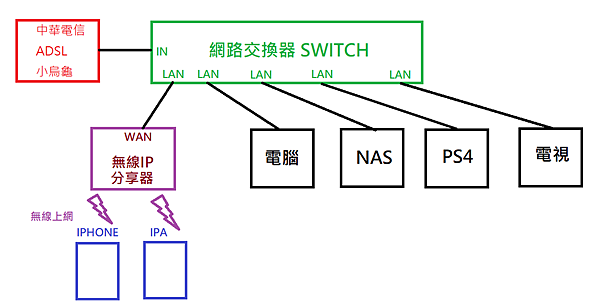
中華電信、無線IP分享器和網路交換器如何連接
因為我的設備越來越多,電腦, PS4, 4K電視,NAS 全都要有線上網,而無線IP分享器只有4個LAN,根本不夠用,於是我立馬去買了一個 8 Port 的網路交換器(也叫SWITCH)。至於買什麼牌都可以,網路上的大大都推薦鐵盒的,於是我也買了鐵盒的,比較可以散熱。
老實說,我在網路上查了一些資料,有些人還亂寫,說什麼要把無線IP分享器的DHCP關閉,他媽的被騙了,如果把無線IP分享器的DHCP關閉,那無線IP分享器形同虛設,iphone , ipad 靠wifi 上網的設備完全連不上無線IP分享器也就無法上網了。
現在公佈一下我的接法:
上面是硬體的接法:
createps 發表在
痞客邦
留言(1)
人氣()
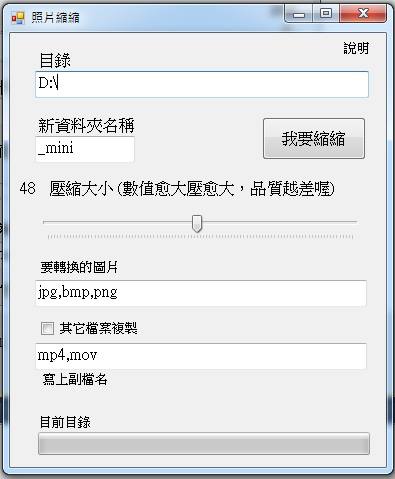
終於寫好了一個圖片壓縮的程式,當你有一個2m的圖片,覺得太大,可以壓縮到100k以下,圖片尺寸不變,質量縮50%,肉眼根本看不出來的啦,而且保留了照片資訊,呼~,也可以批次處理全部的檔案喔^^(花了2小時寫的吧^^)
我給它一個名字叫做【照片縮縮】,希望大家會喜歡^^。無料下載中!!
下載網址: http://goo.gl/68jCBu
createps 發表在
痞客邦
留言(2)
人氣()

facebook 有介紹如何新增應用程式
網址在這
如果你的英文不差,照著作也可以完成,如果你看不下去英文的,就看一下我寫的吧^_^
下面是我的心得: ( 我的App是iOS 7.0 )
createps 發表在
痞客邦
留言(1)
人氣()
public static void DisplayTypeAndAddress()
{
IPGlobalProperties computerProperties = IPGlobalProperties.GetIPGlobalProperties();
NetworkInterface[] nics = NetworkInterface.GetAllNetworkInterfaces();
Console.WriteLine("Interface information for {0}.{1} ",
createps 發表在
痞客邦
留言(0)
人氣()
C# 透過 WMI 取得硬碟序號 ( 物理 / 邏輯磁碟)
請先加入參考 System.Management
using System;
using System.Collections.Generic;
using System.ComponentModel;
createps 發表在
痞客邦
留言(0)
人氣()
在 C#2010 中,我設定 ComboBox.MaxDropDownItems 屬性之後一直都沒反應,都會顯示大量的資料.
原來還得搭配 ComboBox.IntegralHeight = false; 就可以解決。
createps 發表在
痞客邦
留言(0)
人氣()
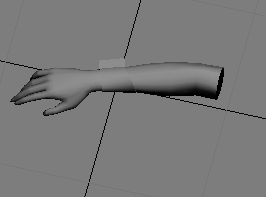
XNA 3D動畫,模型變型
我是用微軟的 Skinned Model 4.0 ,直接套我自己的模形(用Panda plugin輸出X檔案)。結果手臂在彎曲的時候,整個模型變形(圖四)。T T
這是3D Max 裡面的動畫,還沒作動作。(圖一)
這是3D Max 裡面的動畫,第一個動作,手臂彎曲。(圖二)
這在XNA裡面用程式跑出來的動畫,比照圖一,(此為圖三)
createps 發表在
痞客邦
留言(0)
人氣()
最近常遇到配置Bitmap時發生記憶體不足的怪問題。但程式才使用不到900MB
配置的記憶體也不過才40MB,怎麼算都不會不夠呀。索性測試了一下,發現有一下幾種問題存在。
連續載入1個約160MB的灰階圖檔,在Debug模式下,只要載入2~3個,就會出現"記憶體不足"
Bitmap bmp1 = (Bitmap)Image.FromFile(@"c:\a1.bmp");
createps 發表在
痞客邦
留言(1)
人氣()
/// 程序中System.Text.Encoding.Default是指操作系統的當前 ANSI 代碼頁的編碼。
public System.Text.Encoding 取得檔案類型(string filename)
{
System.IO.FileStream fs = new System.IO.FileStream(filename, System.IO.FileMode.Open, System.IO.FileAccess.Read);
System.IO.BinaryReader br = new System.IO.BinaryReader(fs);
createps 發表在
痞客邦
留言(0)
人氣()
private bool 是否為JPG檔案(string 檔案)
{
if (!File.Exists(檔案))
return false;
using (System.Drawing.Image img = System.Drawing.Image.FromFile(檔案))
createps 發表在
痞客邦
留言(0)
人氣()
PictureBox picture = new PictureBox();
picture.Image = Image.FromFile(@"D:\01.png");
picture.SizeMode = System.Windows.Forms.PictureBoxSizeMode.AutoSize;
picture.Location = new Point(30, 10);//加入這一行之後,panel就會出現水平和垂直的Bar
Panel panel = new Panel();
createps 發表在
痞客邦
留言(0)
人氣()
VB.NET
使用 Hex 函數返回數字的十六進制值。
Dim MyHex As String
MyHex = Hex(5) ' Returns 5.
MyHex = Hex(10) ' Returns A.
createps 發表在
痞客邦
留言(0)
人氣()
