- 8月 24 週二 201021:17
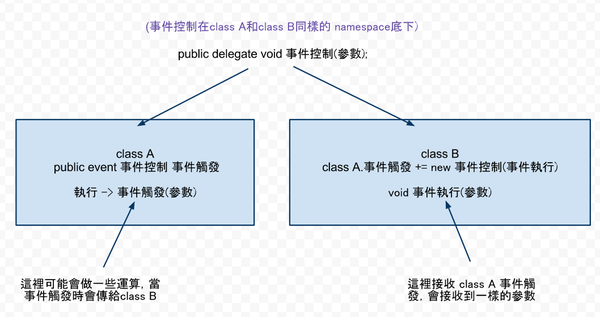
C# 委派和事件
- 8月 23 週一 201015:30
C# 取亂數 record
c#:
Random 亂數 = new Random();//亂數種子
int i = 亂數.Next(0, 100);//回傳0-99的亂數
如果用for 或其它回圈抓亂數,一定要把 Random 亂數 = new Random();//亂數種子 放在回圈外面, VB也一樣。
- 8月 22 週日 201023:18
VB和C# 字串比較 record
VB
pecial character constants (all also accessible from ControlChars class)
vbCrLf, vbCr, vbLf, vbNewLine
vbNullString
vbTab
vbBack
vbFormFeed
vbVerticalTab
""
' String concatenation (use & or +)
Dim school As String = "Harding" & vbTab
school = school & "University" ' school is "Harding (tab) University"
' Chars
Dim letter As Char = school.Chars(0) ' letter is H
letter = "Z"c ' letter is Z
letter = Convert.ToChar(65) ' letter is A
letter = Chr(65) ' same thing
Dim word() As Char = school.ToCharArray() ' word holds Harding
' No string literal operator
Dim msg As String = "File is c:\temp\x.dat"
' String comparison
Dim mascot As String = "Bisons"
If (mascot = "Bisons") Then ' true
If (mascot.Equals("Bisons")) Then ' true
If (mascot.ToUpper().Equals("BISONS")) Then ' true
If (mascot.CompareTo("Bisons") = 0) Then ' true
' String matching with Like - Regex is more powerful
If ("John 3:16" Like "Jo[Hh]? #:*") Then 'true
' Substring
s = mascot.Substring(2, 3)) ' s is "son"
' Replacement
s = mascot.Replace("sons", "nomial")) ' s is "Binomial"
' Split
Dim names As String = "Michael,Dwight,Jim,Pam"
Dim parts() As String = names.Split(",".ToCharArray()) ' One name in each slot
' Date to string
Dim dt As New DateTime(1973, 10, 12)
Dim s As String = "My birthday: " & dt.ToString("MMM dd, yyyy") ' Oct 12, 1973
' Integer to String
Dim x As Integer = 2
Dim y As String = x.ToString() ' y is "2"
' String to Integer
Dim x As Integer = Convert.ToInt32("-5") ' x is -5
' Mutable string
Dim buffer As New System.Text.StringBuilder("two ")
buffer.Append("three ")
buffer.Insert(0, "one ")
buffer.Replace("two", "TWO")
Console.WriteLine(buffer) ' Prints "one TWO three"
C#
Escape sequences
\r // carriage-return
\n // line-feed
\t // tab
\\ // backslash
\" // quote
// String concatenation
string school = "Harding\t";
school = school + "University"; // school is "Harding (tab) University"
// Chars
char letter = school[0]; // letter is H
letter = 'Z'; // letter is Z
letter = Convert.ToChar(65); // letter is A
letter = (char)65; // same thing
char[] word = school.ToCharArray(); // word holds Harding
// String literal
string msg = @"File is c:\temp\x.dat";
// same as
string msg = "File is c:\\temp\\x.dat";
// String comparison
string mascot = "Bisons";
if (mascot == "Bisons") // true
if (mascot.Equals("Bisons")) // true
if (mascot.ToUpper().Equals("BISONS")) // true
if (mascot.CompareTo("Bisons") == 0) // true
// String matching - No Like equivalent, use Regex
// Substring
s = mascot.Substring(2, 3)) // s is "son"
// Replacement
s = mascot.Replace("sons", "nomial")) // s is "Binomial"
// Split
string names = "Michael,Dwight,Jim,Pam";
string[] parts = names.Split(",".ToCharArray()); // One name in each slot
// Date to string
DateTime dt = new DateTime(1973, 10, 12);
string s = dt.ToString("MMM dd, yyyy"); // Oct 12, 1973
// int to string
int x = 2;
string y = x.ToString(); // y is "2"
// string to int
int x = Convert.ToInt32("-5"); // x is -5
// Mutable string
System.Text.StringBuilder buffer = new System.Text.StringBuilder("two ");
buffer.Append("three ");
buffer.Insert(0, "one ");
buffer.Replace("two", "TWO");
Console.WriteLine(buffer); // Prints "one TWO three"
- 8月 22 週日 201020:45
C# 大樂透對獎程式
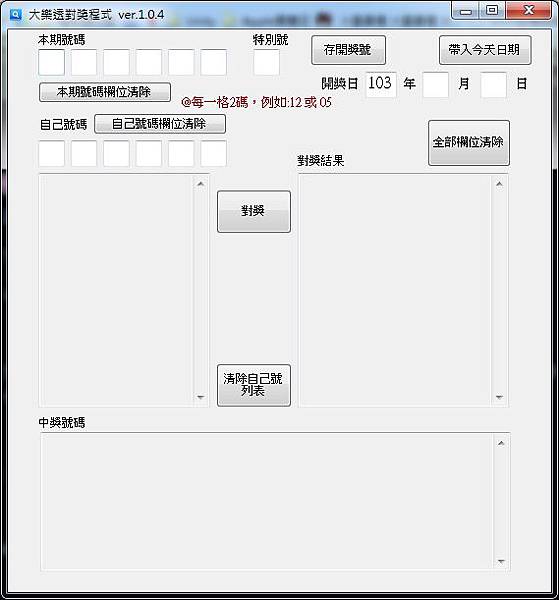
更新:2014/01/24
新的下載地址:
https://dl.dropboxusercontent.com/u/67874009/loto.zip
功能更新
- 8月 22 週日 201009:54
C# function 參數參照 record
void TestFunc(int x, ref int y, out int z) {
x++;
y++;
z = 5;
}
- 8月 22 週日 201009:50
C# 分隔分符串 record
{
static void Main()
{
char[] delimiterChars = { ' ', ',', '.', ':', '\t' };
string text = "one\ttwo three:four,five six seven";
System.Console.WriteLine("Original text: '{0}'", text);
string[] words = text.Split(delimiterChars);
System.Console.WriteLine("{0} words in text:", words.Length);
foreach (string s in words)
{
System.Console.WriteLine(s);
}
}
}
- 8月 22 週日 201000:12
C# 字串格式 record
double[] numbers= {1054.32179, -195489100.8377, 1.0437E21,
-1.0573e-05};
string[] specifiers = { "C", "E", "e", "F", "G", "N", "P",
"R", "#,000.000", "0.###E-000"};
foreach (double number in numbers)
{
Console.WriteLine("Formatting of {0}:", number);
foreach (string specifier in specifiers)
Console.WriteLine(" {0,5}: {1}",
specifier, number.ToString(specifier));
Console.WriteLine();
}
// The example displays the following output to the console:
// Formatting of 1054.32179:
// C: $1,054.32
// E: 1.054322E+003
// e: 1.054322e+003
// F: 1054.32
// G: 1054.32179
// N: 1,054.32
// P: 105,432.18 %
// R: 1054.32179
// #,000.000: 1,054.322
// 0.###E-000: 1.054E003
//
// Formatting of -195489100.8377:
// C: ($195,489,100.84)
// E: -1.954891E+008
// e: -1.954891e+008
// F: -195489100.84
// G: -195489100.8377
// N: -195,489,100.84
// P: -19,548,910,083.77 %
// R: -195489100.8377
// #,000.000: -195,489,100.838
// 0.###E-000: -1.955E008
//
// Formatting of 1.0437E+21:
// C: $1,043,700,000,000,000,000,000.00
// E: 1.043700E+021
// e: 1.043700e+021
// F: 1043700000000000000000.00
// G: 1.0437E+21
// N: 1,043,700,000,000,000,000,000.00
// P: 104,370,000,000,000,000,000,000.00 %
// R: 1.0437E+21
// #,000.000: 1,043,700,000,000,000,000,000.000
// 0.###E-000: 1.044E021
//
// Formatting of -1.0573E-05:
// C: $0.00
// E: -1.057300E-005
// e: -1.057300e-005
// F: 0.00
// G: -1.0573E-05
// N: 0.00
// P: 0.00 %
// R: -1.0573E-05
// #,000.000: 000.000
// 0.###E-000: -1.057E-005
//2007-4-24
this.TextBox7.Text = System.DateTime.Now.ToString("d");
//2007年4月24日 16:30:15
this.TextBox8.Text = System.DateTime.Now.ToString("F");
//2007年4月24日 16:30
this.TextBox9.Text = System.DateTime.Now.ToString("f");
//2007-4-24 16:30:15
this.TextBox10.Text = System.DateTime.Now.ToString("G");
//2007-4-24 16:30
this.TextBox11.Text = System.DateTime.Now.ToString("g");
//16:30:15
this.TextBox12.Text = System.DateTime.Now.ToString("T");
//16:30
this.TextBox13.Text = System.DateTime.Now.ToString("t");
//2007年4月24日 8:30:15
this.TextBox14.Text = System.DateTime.Now.ToString("U");
//2007-04-24 16:30:15Z
this.TextBox15.Text = System.DateTime.Now.ToString("u");
//4月24日
this.TextBox16.Text = System.DateTime.Now.ToString("m");
this.TextBox16.Text = System.DateTime.Now.ToString("M");
//Tue, 24 Apr 2007 16:30:15 GMT
this.TextBox17.Text = System.DateTime.Now.ToString("r");
this.TextBox17.Text = System.DateTime.Now.ToString("R");
//2007年4月
this.TextBox19.Text = System.DateTime.Now.ToString("y");
this.TextBox19.Text = System.DateTime.Now.ToString("Y");
//2007-04-24T15:52:19.1562500+08:00
this.TextBox20.Text = System.DateTime.Now.ToString("o");
this.TextBox20.Text = System.DateTime.Now.ToString("O");
//2007-04-24T16:30:15
this.TextBox18.Text = System.DateTime.Now.ToString("s");
//2007-04-24 15:52:19
this.TextBox21.Text = System.DateTime.Now.ToString("yyyy-MM-dd HH:mm:ss:ffff");
//2007年04月24 15时56分48秒
this.TextBox22.Text = System.DateTime.Now.ToString("yyyy年MM月dd HH时mm分ss秒");
//星期二, 四月 24 2007
this.TextBox1.Text = System.DateTime.Now.ToString("dddd, MMMM dd yyyy");
//二, 四月 24 '07
this.TextBox2.Text = System.DateTime.Now.ToString("ddd, MMM d \"'\"yy");
//星期二, 四月 24
this.TextBox3.Text = System.DateTime.Now.ToString("dddd, MMMM dd");
//4-07
this.TextBox4.Text = System.DateTime.Now.ToString("M/yy");
//24-04-07
this.TextBox5.Text = System.DateTime.Now.ToString("dd-MM-yy");
字符型转换 转为字符串
12345.ToString("n"); //生成 12,345.00
12345.ToString("C"); //生成 ¥12,345.00
12345.ToString("e"); //生成 1.234500e+004
12345.ToString("f4"); //生成 12345.0000
12345.ToString("x"); //生成 3039 (16进制)
12345.ToString("p"); //生成 1,234,500.00%
- 8月 21 週六 201022:46
C# 使用VB的Collection集合 record
1.First, add a reference to Microsoft.VisualBasic to your project. You can find the Microsoft.VisualBasic in the list on the .Net tab when you open the Add reference dialog.
2.At the top of your code, where the using directives are, you add the following line of code:
using Microsoft.VisualBasic;
3.Now you can use the Collections object.
- 8月 21 週六 201021:37
C# 隨心所欲產生圖案 record
隨心所欲產生圖案
Written by: Christoph Wille
Translated by: Jacky Chen
First published: 2000/07/28
要是沒有外部的元件支援,有一些東西是 ASP 無法辦到的,也就是動態產生圖案 - 不管是圖表、橫幅廣告、或是簡單的圖形計數器。幸運的是,這在 ASP.NET 中已經改變了 - 使用內建的方法,圖案可以動態產生以及能夠用最大限度的組態設定能力傳送到 client 端,且很容易辦到。
使用本文章的原始程式碼必須在 Webserver 安裝 Microsoft .NET Framework SDK。同時我也假設讀者對 C# 程式有一定程度的認識。
產生圖案
在還沒感受到 ASP.NET 龐大壓力下,我做了一個較乏味簡單的指令行程式,然後使用這個原始程式碼作為我們 ASP.NET script 的基礎。所不同的是這個指令行會將圖案儲存為一檔案,而 ASP.NET script 將他送到 client 端。
現在,我們的範例程式做了什麼?就像一般常見的,一開始我們使用一般喜歡用的 "Hello World" 程式,文字會輸出成一圖案檔,然後圖案會依據目前所選定的字型以及字型大小,產生同樣大小的 "Hello World" 文字(因此,要產生特大的圖像就無法計算)
下面的 Script (pagecounter.cs) 是典型簡單的指令行程式: 忽略包裹在周圍的 class , 只有函式 Main執行時會被呼叫,這也就是我們產生圖案所在的程式。
using System;
using System.IO;
using System.Drawing;
using System.Drawing.Imaging;
public class CTestBitmapFunctionality
{
public static void Main()
{
Bitmap newBitmap = null;
Graphics g = null ;
try
{
Font fontCounter = new Font("Lucida Sans Unicode", 12);
// calculate size of the string.
newBitmap = new Bitmap(1,1,PixelFormat.Format32bppARGB);
g = Graphics.FromImage(newBitmap);
SizeF stringSize = g.MeasureString("Hello World", fontCounter);
int nWidth = (int)stringSize.Width;
int nHeight = (int)stringSize.Height;
g.Dispose();
newBitmap.Dispose();
newBitmap = new Bitmap(nWidth,nHeight,PixelFormat.Format32bppARGB);
g = Graphics.FromImage(newBitmap);
g.FillRectangle(new SolidBrush(Color.White),
new Rectangle(0,0,nWidth,nHeight));
g.DrawString("Hello World", fontCounter,
new SolidBrush(Color.Black), 0, 0);
newBitmap.Save("c:\\test.png", ImageFormat.PNG);
}
catch (Exception e)
{
Console.WriteLine(e.ToString());
}
finally
{
if (null != g) g.Dispose();
if (null != newBitmap) newBitmap.Dispose();
}
}
}
- 8月 21 週六 201011:00
C# 陣列宣告 record
C# 陣列宣告
C#和C語言的陣列宣告很不一樣,所以特別拿出來介紹。
static void Main()
{
// Declare a single-dimensional array
int[] array1 = new int[5];
// Declare and set array element values
int[] array2 = new int[] { 1, 3, 5, 7, 9 };
// Alternative syntax
int[] array3 = { 1, 2, 3, 4, 5, 6 };
// Declare a two dimensional array
int[,] multiDimensionalArray1 = new int[2, 3];
// Declare and set array element values
int[,] multiDimensionalArray2 = { { 1, 2, 3 }, { 4, 5, 6 } };
// Declare a jagged array
int[][] jaggedArray = new int[6][];
// Set the values of the first array in the jagged array structure
jaggedArray[0] = new int[4] { 1, 2, 3, 4 };
}
